We make SIL Manager and SRS Hub, the software behind the rosters, progress notes, medication records and incident reports of disability and residential care providers. The rules are built in, so they hold at 3 am on a short‑staffed Sunday the same way they hold on audit day.
His NDIS Worker Screening expires on 17 Aug, the day before the shift. Blocked, not overridable.
Choose another eligible workerWORKER_NOT_COMPLIANT
SIL Manager · Medication
Nothing can be recorded against this order
Oliver’s paracetamol order ended on 12 Aug. A prescriber needs to renew it before the dose can be signed for.
View medication ordersNO_ACTIVE_MEDICATION_ORDER
SRS Hub · Today
Morning notes aren’t complete
Joyce B. has no note from Priya’s shift.
Remind Priya or add a late entry
Examples from both products. Names are made up.
Melbourne
MorningAfternoonNight
06:0014:0022:0006:00
Products
Same company, two rulebooks.
A SIL house and a Supported Residential Service can look alike from the street: a home, a team on shift, people who need support with daily life. The rules behind them are different. SIL is funded through the NDIS and overseen by the NDIS Quality and Safeguards Commission. An SRS is a private business, regulated in Victoria by the Social Services Regulator. So each one gets its own product, built on the same foundations.
SIL Manager runs a provider’s houses a fortnight at a time. Build the roster from shift templates, check hours, cost and what’s claimable before you publish, then send it to support workers’ phones. A worker who can’t take a shift can’t be put on it: a screening that lapses before the shift date, a house they aren’t authorised for, approved leave, a participant who has asked not to work with them.
Once a shift is worked, the same record becomes a timesheet, a pay line under the SCHADS Award, and a line on the NDIA bulk payment request, priced against the 2026–27 limits.
Used by
Office and house leaders on the web. Support workers on iPhone.
Pay
SCHADS 2026–27 rates, calculated to gross. Approved hours go to Xero Payroll.
Claims
NDIA bulk payment request file. Remittance matched line by line.
Sign in
yourorg.silmanager.com.au
yourorg.silmanager.com.au/roster
123
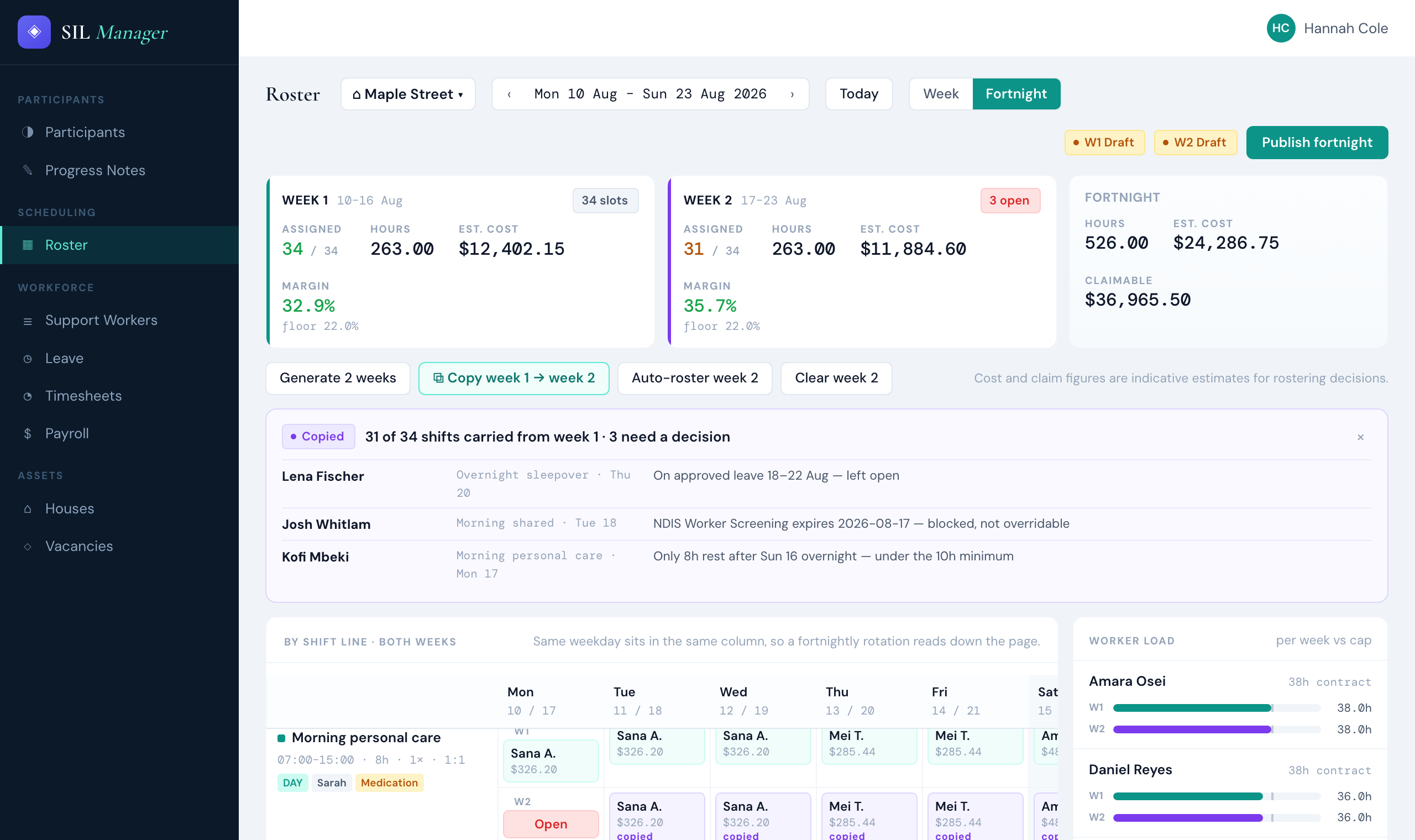
1Both weeks side by side: shifts filled, hours, estimated cost and margin against a floor you set.
2Copying week 1 into week 2 checks every shift again. Josh’s screening lapses before the 18th, so he’s blocked.
3Fortnight totals: what the roster costs, and what it can claim.
Fig. 1 Fortnightly roster for one house. Demo data.
A shift on the SIL Manager app
Two gates: no clocking on until the brief is confirmed, and no records until the handover is read.
1Shift briefWho’s home, what’s changed, what’s due today.
2Clock onInside the house’s geofence.
3Read the handoverFrom the shift before.
4Progress notesTyped or dictated. Speech is recognised on the phone.
5MedicationEach dose against an active order. PRN limits and witness rules apply.
6IncidentsWith an SOS button. Kept on the phone if the signal drops.
7Write the handoverFor whoever comes on next.
8Clock offHours go to the timesheet for approval.
“Getting to footy training on Thursdays. Calling my sister Grace every Sunday night. Making my own coffee in the morning.”
Every participant profile in SIL Manager has a section in the person’s own words. It sits on the same page as the allergies, the behaviour support plan and the NDIS plan dates.
Participants
NDIS plans and budgets, service agreements, consents, support and behaviour support plans, goals with evidence drawn from progress notes.
Roster
Shift templates, fortnightly rosters, open shifts, an all-houses view, and candidates ranked by who is eligible.
Support workers
Credentials with expiry dates and verification, training, supervision, availability and an onboarding checklist.
Timesheets and pay
Approve, adjust or dispute timesheets. SCHADS overtime, broken shifts, sleepovers and casual loading worked out for you.
Claims and billing
2026–27 price limits for national, remote and very remote areas. Lines without a current plan, agreement or consent are held back. SIL quotes from the roster of care.
Incidents
Reportable incidents can’t be closed until the NDIS Commission has been notified. Every restrictive practice use is recorded, and an unauthorised one raises a reportable incident.
Houses
Rooms and occupancy, authorised workers, vacancies and referrals, maintenance, assets and a rent ledger.
Quality and reports
Practice Standards self-assessment, complaints, risks, credential expiry, house P&L and the monthly restrictive practices report.
SRS Hub keeps the resident file, support plans, progress notes, handovers and incidents for a Supported Residential Service, and puts what care staff need on their phone. A shift starts by reading and acknowledging the last handover. It ends with a note for every resident.
Support plans carry their due dates: an interim plan within 48 hours, the ongoing plan within 28 days, a review at least every six months. Notifiable incidents show when the Social Services Regulator needs to hear about them.
Used by
Proprietors and managers on the web. Care staff on iPhone (in testing).
Regulator
Social Services Regulator, Victoria
Pricing
By licensed beds. No per-user fees.
Sign in
yourorg.srshub.com.au
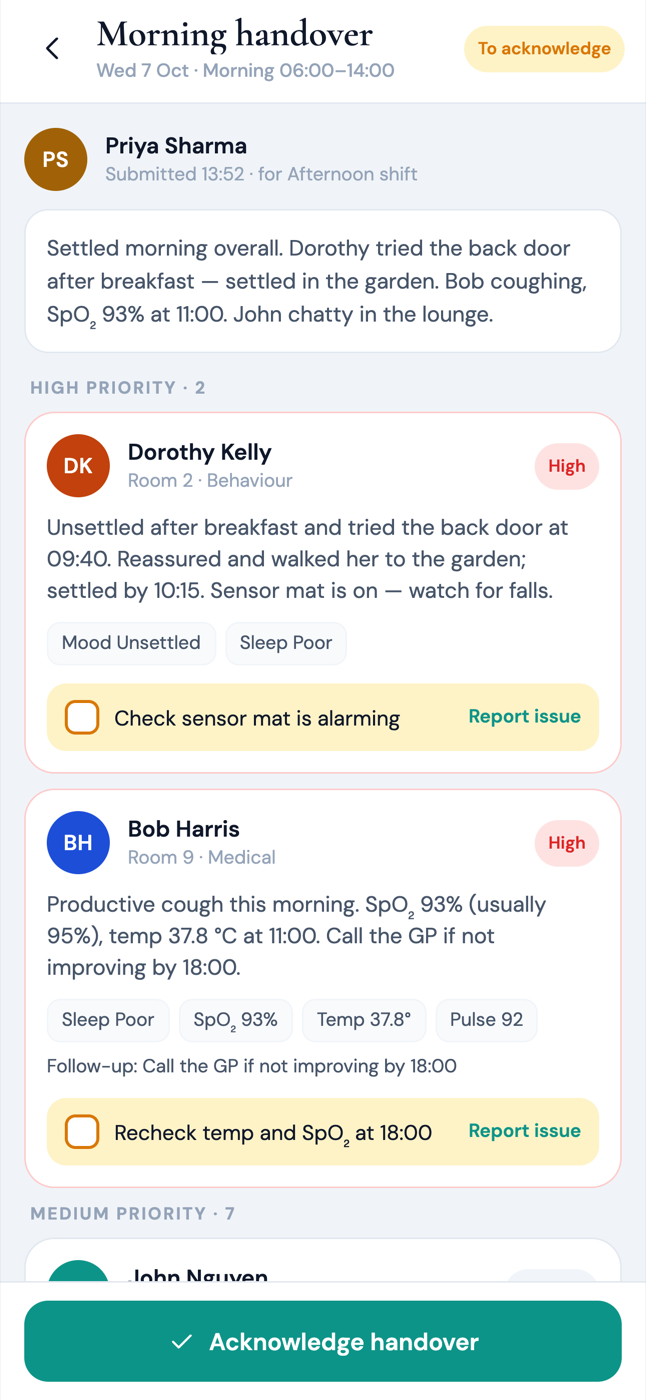
Read the handover
The morning shift’s priorities, highest risk first. It’s acknowledged before anyone starts.
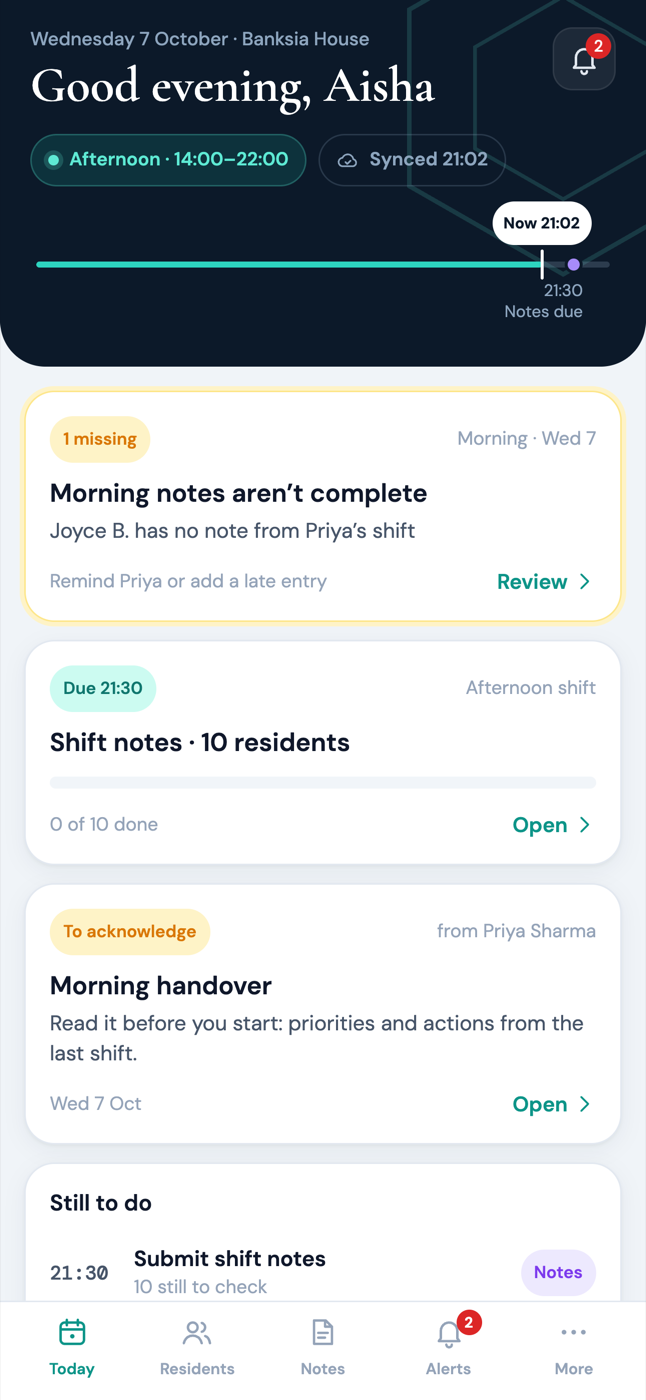
Check what’s due
Notes for ten residents by 21:30. One from the morning is still missing, and the app says whose.
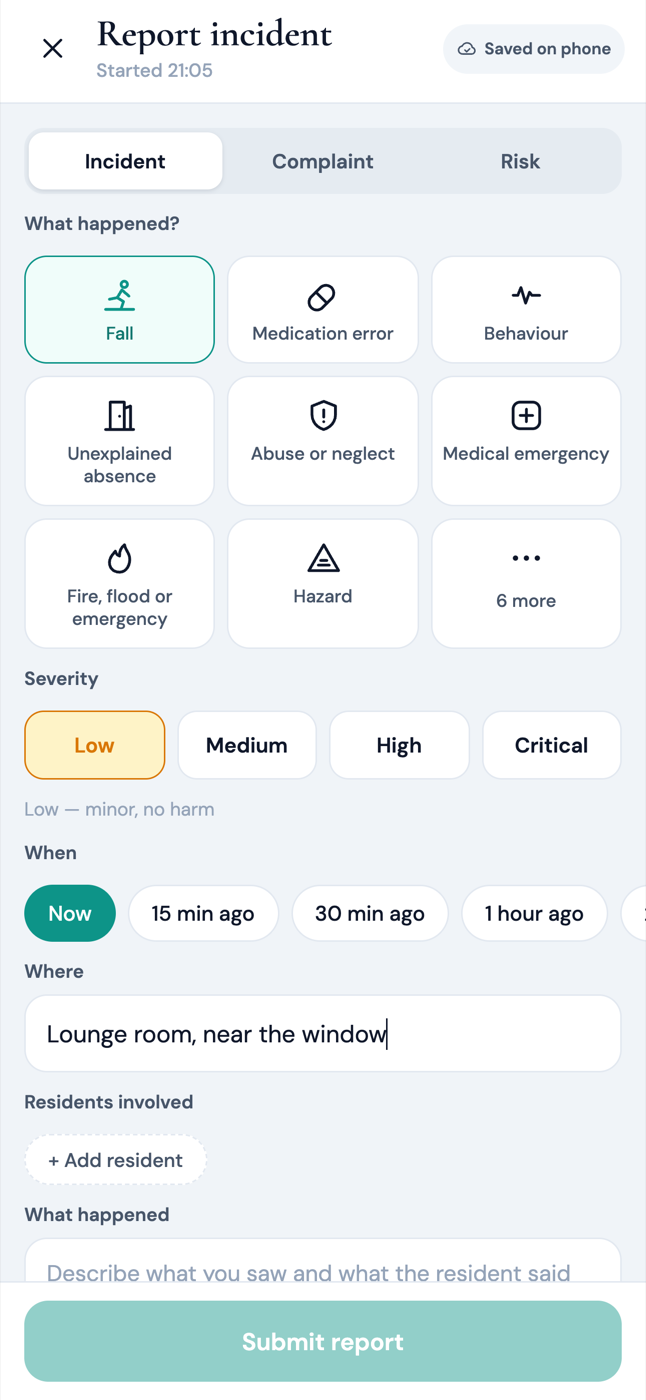
Report an incident
Saved on the phone first, so a weak signal in the back bedroom doesn’t lose it.
The SRS Hub staff app is in testing on iPhone. Screens show demo data.
Residents
Admission and discharge, room and bed, allergies, diet and mobility, photos, and a hospital transfer form in one click.
Support plans
Interim and ongoing plans with due dates and approval. Reviews are flagged before they fall due.
Notes and handovers
Progress notes every shift. Handovers with priorities, follow-ups and vital signs, acknowledged by the next shift.
Incidents
Incidents, complaints and risks with severity and status, and the Regulator’s deadline on every notifiable incident.
Visiting professionals
GPs and allied health write their own notes in a time-limited session while they’re on site.
Rosters
A roster grid and shift templates, with checks that personal support coordinator and first-aid cover is rostered.
Compliance
WWCC, police checks, first aid, the Worker Exclusion Scheme, drills, plan reviews and registration renewal, in one checklist.
The building
Rooms and beds, appointments, and maintenance requests assigned to a named person.
How we build
House rules
A few things we don’t bend on. They’re the reason the software sometimes says no. The examples here are from SIL Manager.
1
Compliance rules block. Warnings get clicked past.
A worker whose screening lapses before the shift date can’t be rostered, by anyone. A dose can’t be recorded against an expired medication order. A reportable incident can’t be closed until the NDIS Commission has been told. Each refusal says why, and what to do next.
SIL Manager · Incidents
This incident can’t be closed yet
It’s reportable and the NDIS Commission hasn’t been notified. The 24-hour notice is due Wed 12 Aug, 10:12.
Record the notification
2
Clinical records aren’t rewritten.
Progress notes, medication records, incidents and handovers are locked once saved. A correction is added as a revision, so you can always see what was first written, by whom, and when.
3
Every change leaves a trail.
Each entry in the audit log is chained to the one before it, so a deleted or altered entry shows up. The chain is sealed every minute and checked every day.
4
One organisation never sees another’s data.
Separation goes all the way down to row-level security in the database, and it’s tested against a real database every time we build.
5
The money adds up to the cent.
NDIS price limits and SCHADS pay rates for 2026–27 are loaded, and you review them before they apply. A price above the limit is refused. Amounts are worked out in exact decimals.
Company
We’re new. Here are the receipts.
Syncwell AU Pty Ltd is a Melbourne software company that builds for the care sector. We make two products, SIL Manager and SRS Hub, and we build and support both of them ourselves.
Everything on this page is in the software today, unless it says otherwise. If you want to check, book a walkthrough and we’ll show you the screen.

 SIL Manager · Roster